PS5 payload · Windows app · Open source

Your PS5's sound.
In your PC headset.

SoundBridge streams your jailbroken PS5's game audio over your home network to a tiny Windows app, with about 50 ms of delay. No PSN, no Remote Play, no capture card.

0 msPC-side delay
0Setup steps on PS5
~0 KBWindows app
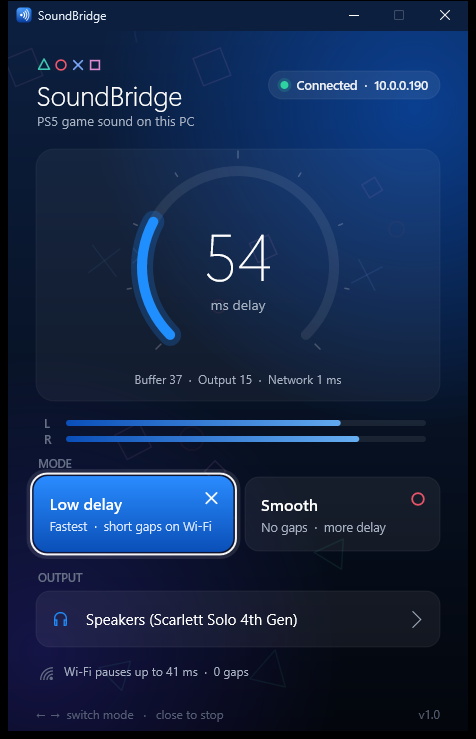
SoundBridge for Windows, connected, 54 ms delay
Live delay54 ms
ModeLow delay
How it works

From the console's audio mix to your ears, in three hops.

The payload taps the same audio mix the PS5 uses for Remote Play, cuts it into 5 ms packets and fires them at your PC. The app buffers only as much as your network needs.

PS5 · SoundBridge.elf UDP · 5 ms packets · 48 kHz stereo Wi-Fi or Ethernet · your home network 54 PC · SoundBridge.exe
01 · CAPTURE

Tap the Remote Play mix

Through libSceAvcap2, the payload reads the console's own audio mix: float stereo at 48 kHz, in 21 ms chunks.

02 · STREAM

Five-millisecond packets

Raw 16-bit PCM over UDP, small enough to never fragment. The PC says hello by broadcast; the PS5 answers and streams.

03 · PLAY

Just enough buffer

A jitter buffer learns your network, trims drift with a ±0.5 % speed nudge and plays through WASAPI's shortest period.

Features

Small, quick, and it gets out of your way.

Low delay

About 50 ms on the PC side over Wi-Fi. The buffer shrinks to whatever your network can hold steady.

Zero setup

The app finds your PS5 by itself and remembers it. Open them in any order; resending the payload just swaps it.

No PSN needed

No Remote Play pairing, no account, no capture card. Just the payload and the app.

Two modes

Low delay plays as early as possible. Smooth buffers over Wi-Fi hiccups. Switch any time.

No clicks

Every gap fades out and back in, and late bursts are skipped, so delay never creeps up.

PS5-style app

A native Direct2D window, about 250 KB, no installer. Uses ~0.5 % CPU while it plays.

Modes

Pick your trade-off.

Some PS5 Wi-Fi links stall for ~100 ms every few seconds. Low delay plays straight through them as a short faded gap; Smooth waits them out. Try it:

Sent by the PS5What you hearWi-Fi pause
Latency

Where every millisecond goes.

Measured on a PS5 (13.60) on 5 GHz Wi-Fi and a PC with a Focusrite Scarlett Solo. Hatched parts are estimates.

PS5 capture chunkNetworkJitter bufferWindows output

Wi-Fi · Low delay measured, PS5 part estimated~65 ms

Ethernet · Low delay estimate~45 ms

Wi-Fi · Smooth measured, PS5 part estimated~130 ms

The PS5 hands over sound in 21.3 ms pieces (smaller reads are refused), so on average a sample waits ~11 ms before it even leaves the console.

Get started

Up and running in a minute.

  1. Download SoundBridge_PS5_13.60.elf and SoundBridge_Windows.zip from the latest release.
  2. Open SoundBridge.exe on your PC. Allow it through the Windows firewall if it asks.
  3. Send the .elf to your PS5's ELF loader (port 9021), e.g. with PS5Upload.
  4. Play. The app turns green, Connected, and your game sound is in your headset.

Requirements

  • A jailbroken PS5 with an ELF loader. Tested on firmware 13.60.
  • Windows 10 or 11 on the same home network.
  • Any output device: headset, audio interface, speakers.
  • Ethernet on the PS5 is optional, but gives the lowest, gap-free delay.
# or send it from any PC with Python python -c "import socket;s=socket.create_connection(('PS5_IP',9021));s.sendall(open('SoundBridge_PS5_13.60.elf','rb').read())"
FAQ

Good questions.

Does it work with WiredBridge or other payloads running?

Yes. SoundBridge only reads the audio mix and uses UDP port 9399, so it runs alongside controller payloads.

Why do I hear a tiny gap every few seconds?

That's your PS5's Wi-Fi briefly pausing (the app shows how long in its bottom line). Use Smooth mode to hide it, or connect the PS5 with an Ethernet cable to remove it.

Can I choose where the sound plays?

Yes. Click Output in the app and pick any device. It remembers your choice and reconnects if the device is unplugged and plugged back in.

Does the PS5 still play sound through HDMI?

Yes, nothing changes on the console. SoundBridge copies the mix; it doesn't redirect it.

How do I stop it?

Close the app. The payload keeps running until the PS5 restarts but only sends audio while the app is open.

Is it safe?

It's a homebrew payload for a jailbroken console. It doesn't write to system files, only to /data/soundbridge. Use at your own risk.